Running the wall on a screen
At an event, a talk or a party, put the wall on the big screen and let the room add to it. New answers land on the screen as they come.
The TV link
Every wall has a big-screen link: its own link with /tv on the end. Find it in the wall's pill card, or on your page for the wall under On a big screen. Pressing the row copies the link and shows a QR code of it, so you can open it on the screen's browser without typing.
Open it on any television browser, a laptop plugged into a projector, or a streaming stick. It fills the screen with the wall at a size you can read from the back of the room, drifting slowly so every square gets its turn. Zoom out if you want more of it on screen at once.
The QR for the room
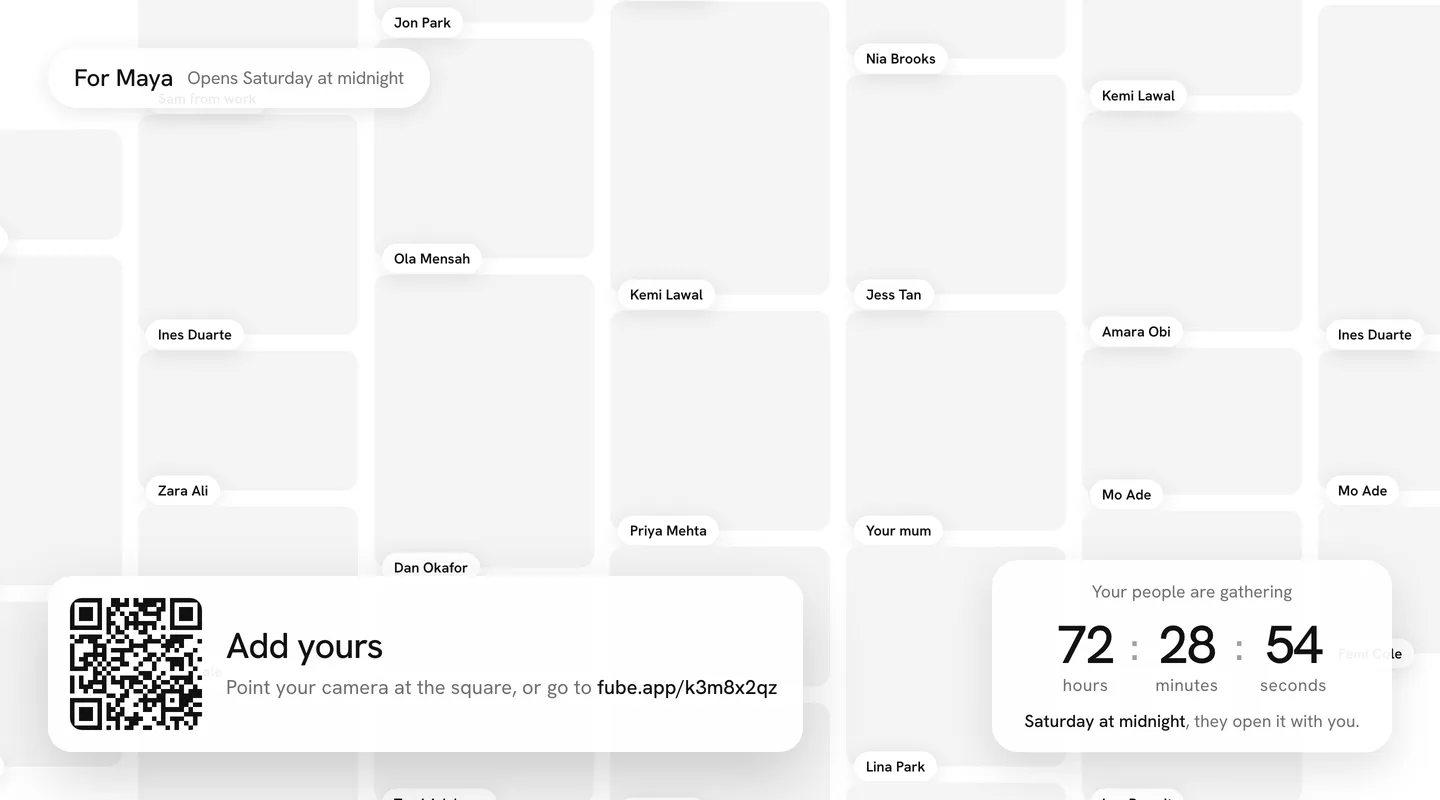
While the wall takes answers, the screen shows a QR code in the corner. Anyone in the room scans it with their phone camera, and the wall opens on their phone with the composer already up. They add their square, and a moment later it flies onto the big screen with their name.
Before it opens
A wall that opens at a moment shows face down on the screen, with names arriving and a countdown in the corner. It never opens on the screen by itself: the door is for the person it is for, on their own device.
Keeping it tidy
With approval on, answers from the room wait in your queue, and only the ones you approve reach the screen. You can approve from your phone while the screen runs.